This status means that carriers have been contacted, but none have agreed to provide a quote for the delivery.
To understand the refusal motive, you can go to the "Carriers in demand" section and click on the contacted carrier to see the refusal reason:
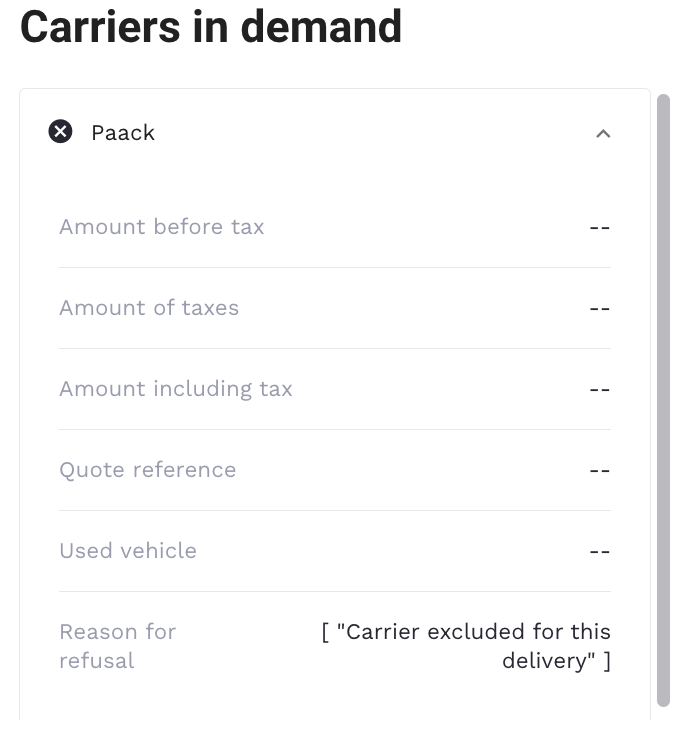
The refusal reason will give you a more precise understanding of what you should do to solve the problem. You can also check the order content to have more information about what caused the refusal.
If, after the correction, the problem still persists, you should contact your Woop project manager or Woop support team.
If there is another error message (Unavailable carriers, No carrier, etc.), then you or your Woop project manager has to contact the carrier.
Refusal reasons:
- Dimensions: A dimension can block your order if it is out of range and exceeds the carrier's maximum capacity.
Action to take: check the carrier restrictions and correct your order via "Actions"-> "Edit" button.
- Product weight: The product weight can block an order if it exceeds the carrier's maximum capacity.
Action to take: check the carrier restrictions and correct your order via "Actions"-> "Edit" button.
- Total order weight: The order weight can block an order if it exceeds the carrier's maximum capacity.
Action to take: check the carrier restrictions and correct your order via "Actions"-> "Edit" button.
- Distance: When an order has an excessive distance between the departure and delivery addresses, this can block an order.
Example: 150 km
Action to take: check if the addresses are correct.
If no, check the carrier restrictions and correct your order via "Actions"-> "Edit" button.
If yes, contact the carrier to understand what went wrong.
- Special characters: Any special characters entered for an order can block an order. Example: (/, ?, !, é, & )
Action to take: delete the special characters present in the order's input fields.
- Time slots: An order can be blocked if the carrier does not deliver during the particular time slot (Saturdays/Sundays/bank holidays/etc) or the carrier is no longer available(he has no more vehicles or people to make the delivery).
Action to take: change the time slot, e.g., if the original time slot is 8 am-10 am, you can try to change it → 9 am-11 am.
If you have tried to enter several time slots and the order is still blocked, we suggest that you reschedule a delivery for a later date or contact the carrier to find out which time slots they technically accept/understand the reason for the refusal.